Prepares a summary of the meeting based on the recognized speech in Zoom Workplace.
What gets into the summary
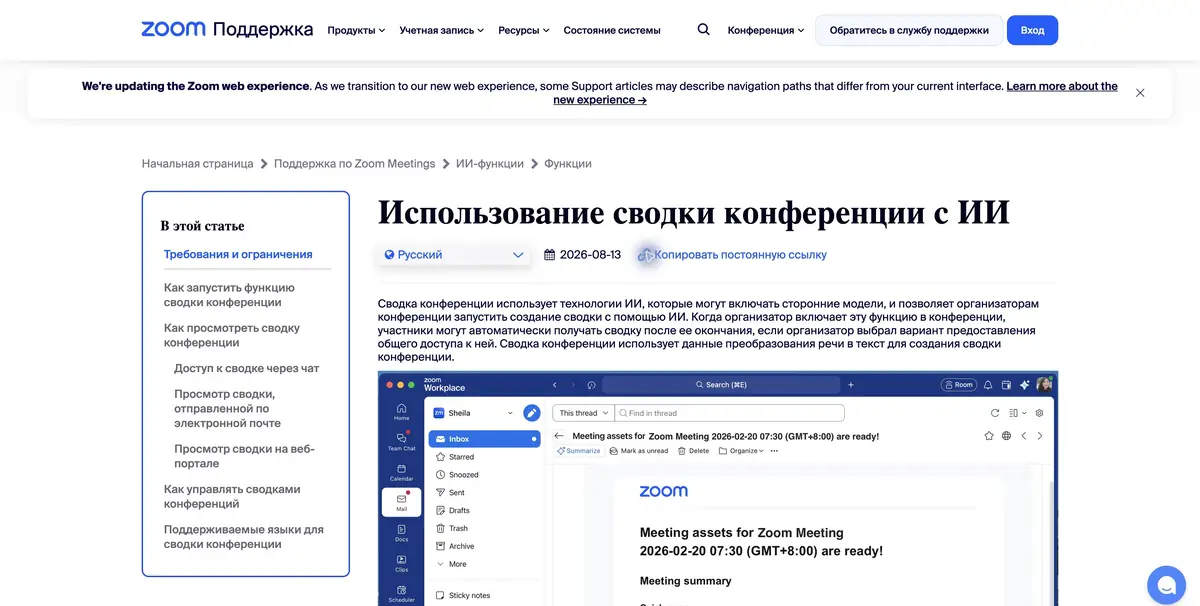
At the meeting, work was divided according to the new instructions, but one participant joined after discussion. Meeting Summary helps to restore the course of the meeting and highlight the following steps. When the organizer turns on the function, Zoom uses recognized speech to summarize. The organizer sets in advance how to share the result with the participants, and the organization's policy may limit the options available.
The name Zoom AI Companion appears in previous instructions. Zoom explains that the summaries and other familiar features remained part of Zoom Workplace and are now called by their actions.
Check the difference between an idea and an assignment
In the training meeting, suggest sending a draft on Wednesday, then move the date discussion to the materials check. Name the executor for only one of the tasks. After the call, open the summary. The date that has been postponed should not have the status of a promise. Check the names and specify what actions the participants are ready to take as instructions.
Check the recognition language first. If the conversation is constantly switched between languages or participants interrupt each other, it is useful for a person to check important replicas with the record when it is there.
Who can send the result
Zoom connects access to its plan, organizer role, and account settings. Inform participants in advance about the speech processing. If questions with different levels of access are discussed at the meeting, first check the recipients and the text of the summary. For the general channel, you can prepare a separate short version of the confirmed items.
Suitable tasks
- Prepare an auditable summary of the working meeting
- Check the next steps after ringing
Strengths
- Built-in feature in Zoom Meetings
- The organizer manages access to the summary
Limitations
- Names and orders need to be verified
- Access depends on the plan and settings
Selection and conditions
- Free access
- Not confirmed
- Trial period
- Not confirmed
- No sign-up required
- Not confirmed
- Russian interface
- Not confirmed
- Local installation
- Not confirmed
- API
- Not confirmed
“Not confirmed” means there is not enough information. The feature may still be available; check the developer’s terms.
- Input formats
- Audio
- Result
- Text
Terms
For the summary, the organizer must include a function. Check the recipient's settings.From task to first result
Practical example
- Task
- Prepare an auditable summary of the working meeting
- What to prepare
- A recording of an agreed project discussion, checked notes, the current brief and correct client names.
Task brief or prompt
Task: prepare a brief from the selected meeting and attached materials. Separate confirmed goals, constraints, decisions and open questions. Do not assign a deadline or owner without agreement. Preserve a way to check disputed claims against the original conversation.
Expected result
An editable draft of client material based on actual context; choose the document or presentation format in the product.
How to check the result
- Check names, dates and promises against the recording.
- Confirm that the correct client context was used.
- Open the export and correct tables, line breaks and formatting.
- Approve the content and recipients before sharing.
An editorial teaching example of a task brief, not the result of hands-on testing of the service. Check that the required mode is available, that you have rights to the source material and that the intended use of the result is permitted.
Check details
Official sources
This description is based on the developer’s material. Features, prices and availability may change; check the primary source before use.