Ghostreader in Readwise Reader responds by saving a document, highlighting, or reading position.
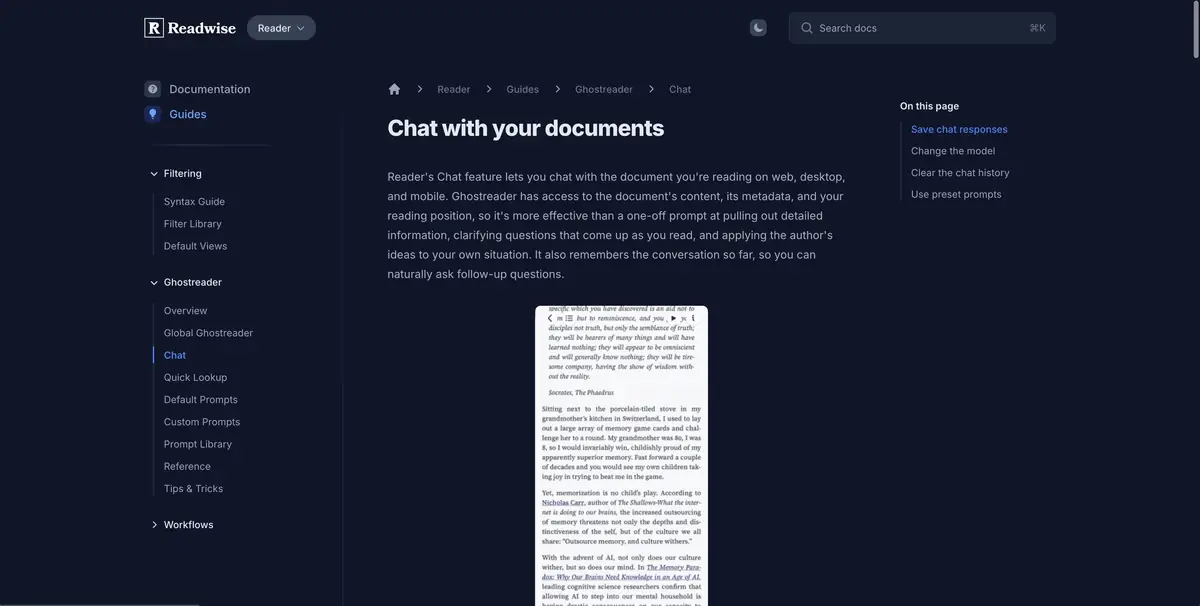
The question is right in the reading
In the long article, a term was found that the author explained only at the beginning. In Readwise Reader, you can open Ghostreader and ask a question while staying in the saved document. Help describes the use of text, document information, and current reading position. For an exact question, you can start with the selected fragment. It is easier to separate the comment on one phrase and the question about the article as a whole.
After answering, go back to the paragraph. If part of the argument remains unclear, keep your own note nearby.
Address the author's comment
Save the training text, where the effectiveness of the method was checked on two types of materials, but the conclusion was made only for one. Select the paragraph with the result and ask where the author limits the application of the conclusion. Then find the right paragraph and read the neighboring sentences. Note whether the number of experiments, the name of the material and the boundary at which the author formulated the conclusion coincided.
If the question concerns the whole document, expand the context. When it comes to a difficult phrase, leave a sentence in the selection before it and after. It helps to check what the text itself gives meaning.
How the work context is maintained
Reader stores saved materials and highlights in the Readwise library. For serious work, keep your marks on the verification and source links. Ghostreader and subscription modes are described separately. When switching between devices, check where the desired method is available to open the chat and use the saved note.
Suitable tasks
- Check the meaning of the selected phrase
- Clarify the limitations of the saved article
Strengths
- The question is tied to the material in the reader
- You can discuss the selected fragment
Limitations
- Access linked to Readwise subscription
- Clarifications and conclusions should be checked by text
Selection and conditions
- Free access
- Not confirmed
- Trial period
- Yes
- No sign-up required
- Not confirmed
- Russian interface
- Not confirmed
- Local installation
- Not confirmed
- API
- Not confirmed
“Not confirmed” means there is not enough information. The feature may still be available; check the developer’s terms.
- Input formats
- Text, Document
- Result
- Text
Terms
Save the desired document in the Reader and select the context by volume of the question.From task to first result
Practical example
- Task
- Check the meaning of the selected phrase
- What to prepare
- Allowed set of documents or saved working context with notes about the project.
Task brief or prompt
Find out what decisions on the project are confirmed by available sources. Specify the source of each decision, its date, if known, and unresolved issues. Separate the baseline information from the assumptions.
Expected result
Summary of confirmed decisions with verifiable references or indications to sources.
How to check the result
- Open these documents or context records.
- Make sure that the outdated discussion is not presented as a decision.
An editorial teaching example of a task brief, not the result of hands-on testing of the service. Check that the required mode is available, that you have rights to the source material and that the intended use of the result is permitted.
Check details
Official sources
- The Readwise Reader App
- Ghostreader Chat with Document
- Embedded Ghostreader Requests
- Subscribe Readwise
This description is based on the developer’s material. Features, prices and availability may change; check the primary source before use.