
A practical guide
One character across Nano Banana scenes: working with a reference
An image series needs a recognisable character. Here is how to prepare a reference image, describe fixed details and spot an unwanted character change before it spreads to later scenes.
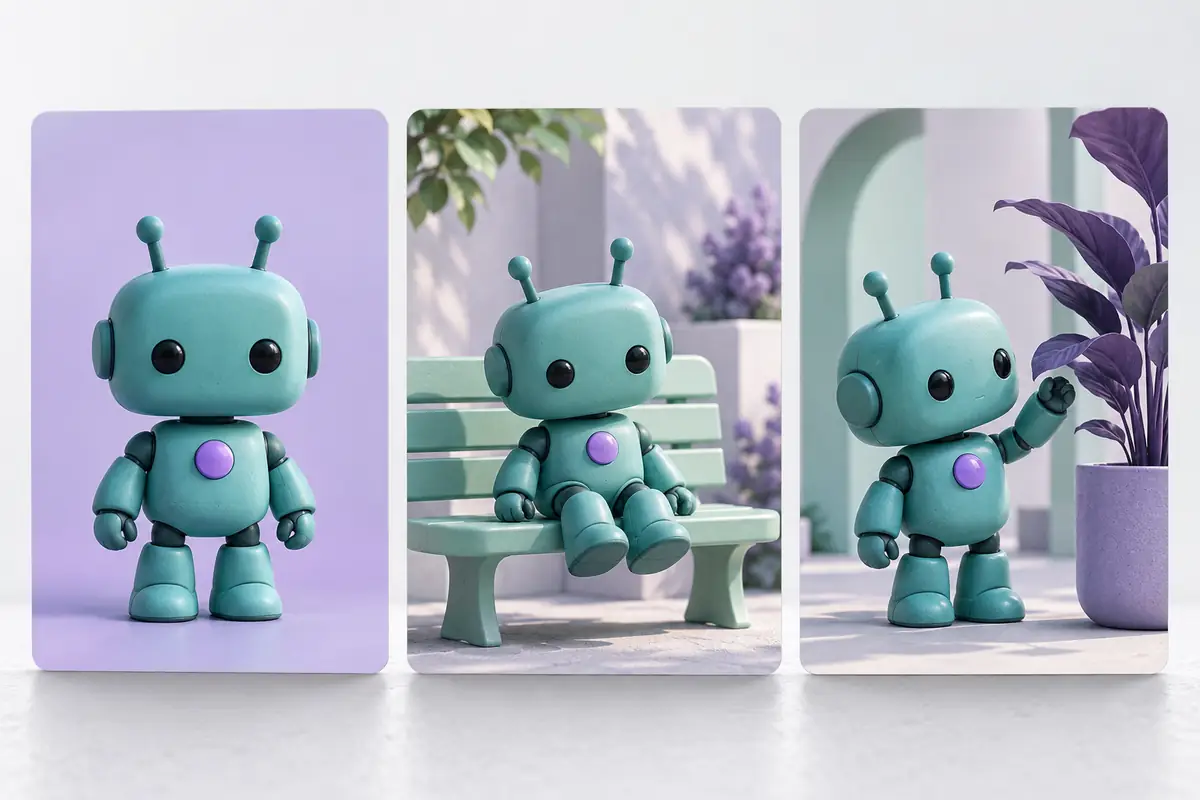
First, determine what makes the character recognizable
Changing scenery often works better than preserving a character. A toy robot has a round head in one image, an elongated head in the next and a different chest symbol in the third. Each image may appeal on its own. Side by side, they look like three different toys.
For our example, use a fictional character of our own: a matte turquoise robot with a rounded rectangular head, two dark round eyes, short arms and a purple circle on its chest. Record those features separately. They are the checklist for every new scene: in the workshop, garden and library.
Google’s documentation describes image-based editing and preserving character likeness. Test this capability on your own material: it does not guarantee that every detail will remain identical. The method below is a practical way to frame tasks and select results, not a report of a test we performed.
Prepare a reference image
Start with an image showing the whole character, well lit and unobstructed. A subdued background makes the silhouette easier to check. The reference should clearly show head shape, eye positions, where the arms meet the body and the chest symbol. Leave complex props for later: a mug in a hand may hide an important part of that hand.
If you are creating a character from scratch, first choose a successful version and save the original file. It will be the reference for the whole series. Give it a clear name, such as robot-reference, so you do not confuse it with later edits. If you use an existing image, make sure you have the right to upload and modify it.
A small or blurry original gives the model more room to guess. Inspect it enlarged before starting. The purple circle must actually be circular, not a vague patch that could become a button in the next image.
Separate the prompt into fixed features and the new scene
Upload the reference to a mode supporting image-based editing. First explain how the result should relate to the original, then list the features to preserve. Next specify the action, surroundings and composition. “The same robot” may not be enough, especially after several changes.
Example prompt: “Use the attached image as the character reference. Preserve the matte turquoise body, rounded rectangular head, two dark round eyes, short arms and purple circle at the centre of the chest. Show the robot in a bright workshop, standing beside a table and examining a wooden part. Full-body composition, soft daylight and the original illustration’s style. Change the surroundings and pose; keep the character’s appearance consistent with the reference.”
The prompt states an intention but does not technically lock details. When several model options are offered, check that the selected mode supports references and successive edits. Nano Banana options may have different terms.
Build the series around one reference
Generate a simple workshop scene and check the likeness first. Then create a garden scene with the robot watering a small bush. For the library, use a different pose: the character carries a book. Keep the key-feature description and original reference file in every task.
The following picture can be based on the previous one, if it is important for you to continue a specific movement or composition. However, an unnoticed error with this approach can go further: a slightly elongated head will become the new norm. For independent scenes, it is more convenient to return to the approved reference and compare the result with it.
The light in the garden and library will be different, so the surface shade may look different. If color accuracy is important for the project, provide a separate color check after generation. One color name does not provide an exact match.
Compare the character in detail
Place the reference beside the new image. Check silhouette and proportions first: has the head grown, have the arms lengthened or has the body changed? Then zoom in on the eyes and chest symbol. The purple circle must retain its shape, position and size relative to the body.
Next, inspect the material and visual character. A matte toy may acquire a glossy surface, dark eyes may start glowing and a simple body may gain extra panels. For this series, those changes count as errors even if the image looks more striking.
Inspect the character’s interaction with the scene separately: a hand holds the book, objects do not pass through the body and feet rest on a surface. These checks concern the individual image’s quality. A good likeness does not remove the need to inspect pose and surroundings.
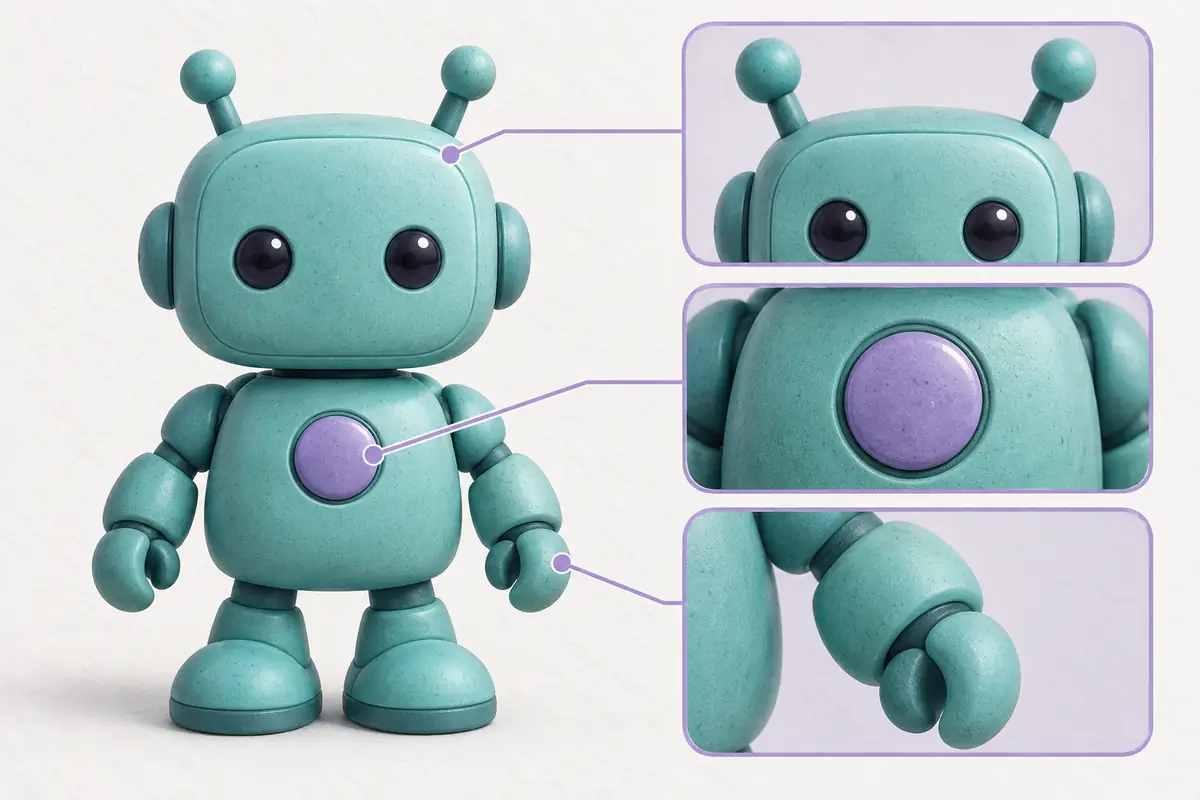
Correct a noticeable deviation with a separate prompt
If the scene works but the chest symbol has become oval, request a local edit: “Restore the purple symbol’s circular shape and reference size. Preserve the pose, lighting and surroundings of the current image.” Compare the whole character again afterwards: changing one detail can affect adjacent ones.
If the head, eyes and body proportions all change together, rebuilding the scene from the reference image is easier. Keep successful intermediate files separately so you can return to a chosen version without relying only on chat history.
What to save alongside the finished images
Keep the reference file, approved images and prompts in one folder, with a short note listing the character’s features. If a fourth scene is needed later, you can recover the brief without guessing from a finished image.
Visual recognisability is usually enough for a presentation or short story. If you need an exact industrial product, marking or branded character, define a stricter acceptance process and allow for manual refinement. Generation prepares variations; you decide which fit the project.

