

DeepFace Video transfers the face from the photo to the uploaded video. The service works in the browser: you prepare two files, start processing and check the replacement.
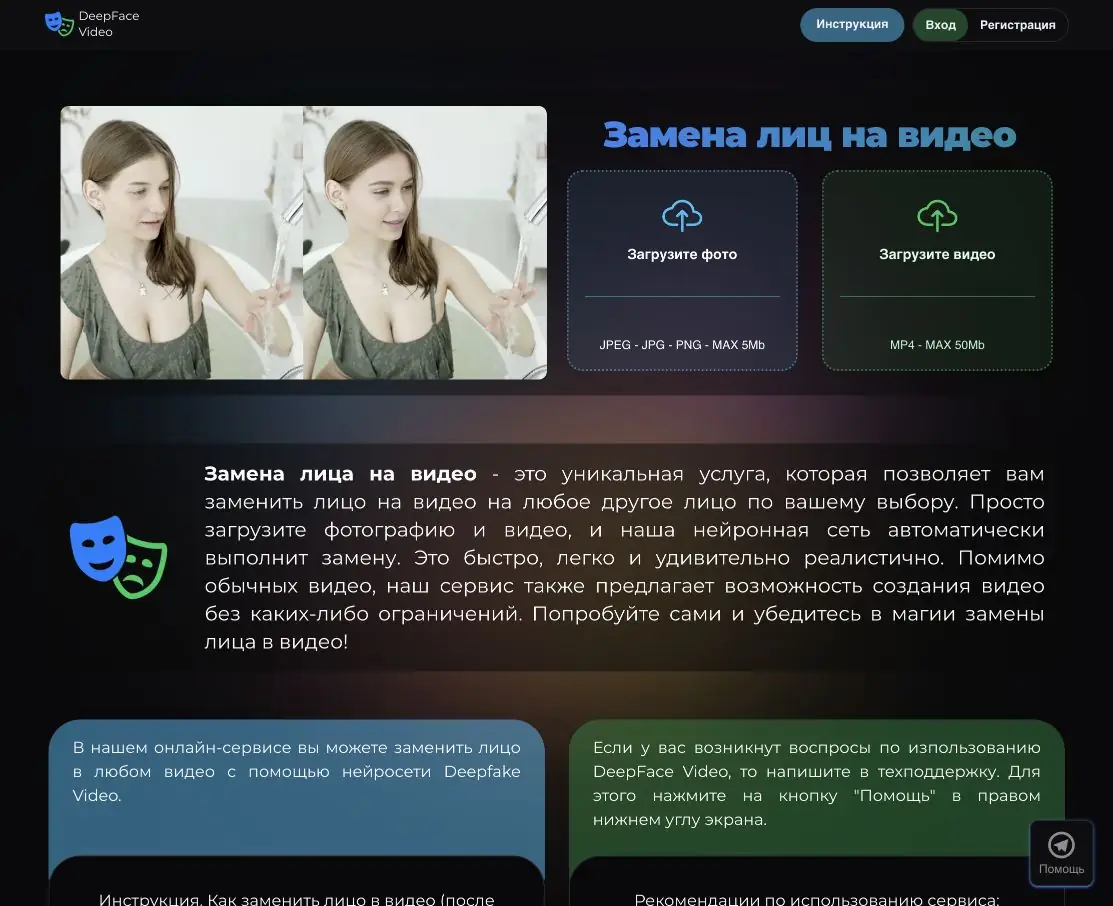
What DeepFace Video does
If a scene has already been filmed and one character’s face needs replacing, you do not have to create the whole video again. DeepFace Video uses an existing video and a separate portrait: the photograph supplies the replacement face, while the video supplies the scene. That is the workflow described on the official website.
This is a specialised face swap service, not a general text-to-video studio. Its public instructions do not promise new story generation, replacement of every person in a group shot or a complete edited sequence. Choose it for a particular operation on prepared material.
Two input files and a browser-based start
The website supports registration and sign-in. Once signed in, add a photograph to the portrait field, upload a clip in the video field and start the task. The form previews source files, shows the clip’s duration and calculates the amount before confirmation.
Portraits are accepted as JPEG, JPG or PNG files up to 5 MB; the video form specifies MP4 and a maximum of 50 MB. The rules separately limit duration to 2 seconds through 10 minutes. Both limits apply: a long video can exceed the file-size limit even when it meets the duration limit.
The instructions give an estimated processing time of 2 to 10 minutes, depending on the source clip’s length. This is the service’s estimate, not a guaranteed turnaround for every task.
Which face will be replaced?
The service processes one person. Its instructions say selection begins with the first frame: it chooses whoever appeared first, or the leftmost face if that frame contains several. This matters for a two-presenter scene: the published workflow does not offer arbitrary selection of the second person.
A short source clip with one person and a clearly visible face is the most predictable starting point. The photograph must contain the whole face with space around its edges. Hair and object occlusions make video processing harder; the rules explicitly allow inaccuracies for anime and drawings. Similar face shapes in both source files are also recommended.
Example: a short video greeting
For a greeting, you can use your own scene featuring one person and, with their consent, a suitable portrait. Prepare a short clip first: it is easier to check whether the right person has been selected and how convincing the face looks in motion. The site’s gallery shows the nature of the operation, but does not prove that every uploaded video will produce the same result.
Watch the entire result, then focus on head turns and lighting changes. Inspect the face outline, eye area and transition to the neck. The rules recommend that the replaced face occupy no more than 30% of the image area; close-ups may reveal stronger artefacts. Assess expression and edge consistency on your own material.
Balance, cost and access
The web interface provides an account balance, top-ups and confirmation of the task cost. Pricing relates to the video’s duration. The public material reviewed does not confirm a permanent free mode or trial quota, so do not rely on either in advance.
The public rules and offer pages list different rates. We therefore give no exact price here: check the amount in the payment form and ask support to clarify the terms before topping up. The official website links to help, instructions, rules and the offer.
What to consider before uploading
Images and videos are sent to the service for processing. Its terms include a confidentiality obligation, but that does not make an upload local processing or justify promising a particular file-deletion deadline. Do not send other people’s private material without permission.
Publishing requires rights to the source video and consent from the person whose face is used. The rules prohibit fraud and 18+ content; the service states that tasks are moderated. If you need automation, contact the developer first: public documentation for a user API was not found in the sources checked.
Suitable tasks
- Face swapping in your own video greeting
- Entertainment video with the consent of participants
- Personalizing an existing scene with one person
- Checking a face swap in a short video clip
Strengths
- A straightforward task: a portrait and an existing video
- Upload, preview and cost calculation in the web form
- Public guides to preparing a photo and video
- A gallery of official output examples
Limitations
- Only one face is replaced, selected by its order of appearance and position in the frame
- MP4 up to 50 MB, duration from 2 seconds to 10 minutes; photo up to 5 MB
- Occluded faces, close-ups and illustrated characters may produce inaccuracies
- Rates differ across public pages; confirm the exact cost before paying
- Public API documentation not found
Check details
Official sources
- Official DeepFace Video
- Guide: photo, video and selecting the face to replace
- Service rules and source-file requirements
- Terms of service: processing materials and payment conditions
- Official gallery of examples
This description is based on the developer’s material. Features, prices and availability may change; check the primary source before use.


