

WRITER combines an enterprise AI agent with a platform for building controlled applications. The service has its own Palmyra model family, data tools and developer interfaces.
Shared context for the team
WRITER is designed to organize AI work within the company. An employee can prepare material, discuss documents and access connected knowledge, and an administrator can manage available models and rules. This does not eliminate the need to determine in advance what information is generally permissible to transfer to the system.
For a useful implementation, start with one source of knowledge and an understandable result. If you immediately connect a lot of heterogeneous materials, it will become more difficult to understand why the agent gave a certain answer and where the inaccuracy arose.
Palmyra, knowledge and managed tools
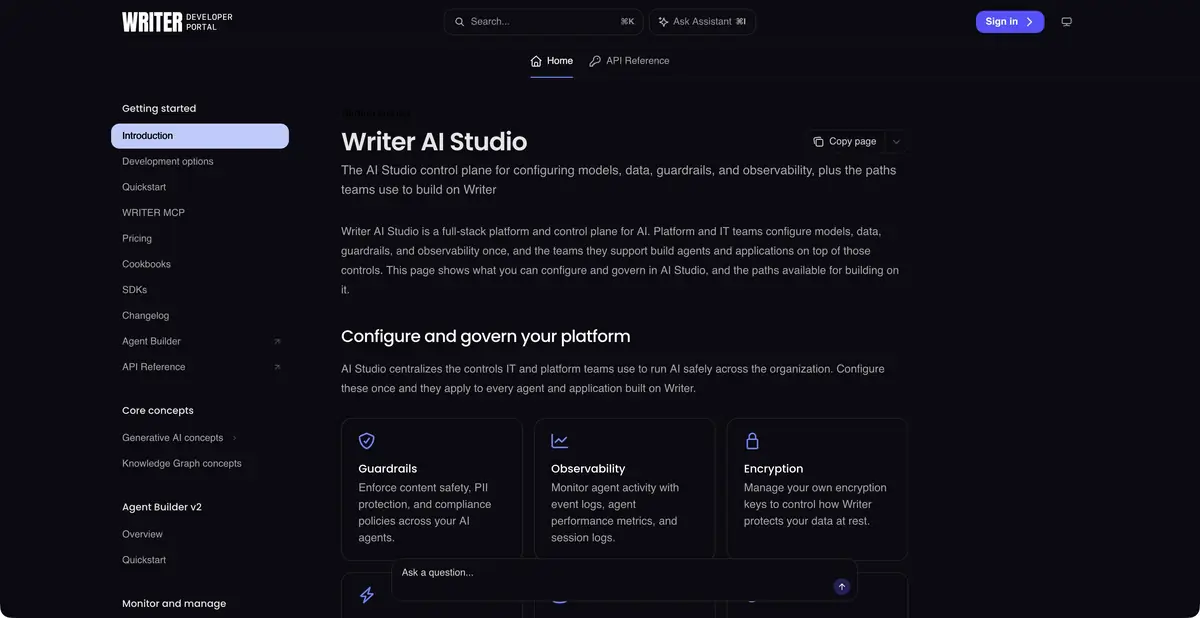
Official documentation describes Palmyra models, Knowledge Graphs, data connections and developer tools. AI Studio brings together model settings, guardrails, observability and usage controls. Specific features depend on the plan and administrator permissions.
The platform also allows connections to external models. Their presence does not mean every employee receives access to every model by default. For comparison, look at the team's actual enabled configuration and the rules for using materials.
Example: prepare an answer based on an internal policy
A company can build an assistant for questions about purchase approvals. Provide only current documents and require supporting passages. Ask it to flag cases where a responsible employee must make the decision.
Check the issues with exceptions, different versions of the regulations and missing data. The answer “needs clarification” is better than a fictional procedure.
Programmatic access and custom logic
Developer materials describe APIs and SDKs, chat completions, Knowledge Graph and tool calling. Application development teams can deploy their own logic under the platform's management. Keys, permissions and correct error handling are required.
Before enabling external actions, define the stages that require manual approval. An agent's request is not sufficient grounds to send a document or change a record. Logs should retain diagnostic data without uncontrolled disclosure of company content.
Check capabilities against the current help documentation
WRITER is actively changing workflows and tools. The official help describes migrations of old agents and supported models; old instructions may not match the current interface. Therefore, the date and status of a particular document is important for implementation, even if the product name remains the same.
Facts, quotations and calculations in answers require checking. Before signing up, clarify the plan, included features, storage location and required permissions. Enterprise settings alone do not guarantee that every answer is correct or automatically complies with your organization's rules.
Suitable tasks
- Prepare an answer based on approved corporate documents
- Build a managed AI process for the team
- Connect generation and knowledge via API
- Configure available models and usage controls
Strengths
- Proprietary Palmyra models and an enterprise platform
- Documented knowledge management and developer tools
- Centralized model settings and observability
Limitations
- Data preparation and permission setup are required
- Old instructions may refer to unsupported tools
- Conclusions and facts in the results require manual verification
Selection and conditions
- Free access
- Not confirmed
- Trial period
- Not confirmed
- No sign-up required
- Not confirmed
- Russian interface
- Not confirmed
- Local installation
- Not confirmed
- API
- Yes
“Not confirmed” means there is not enough information. The feature may still be available; check the developer’s terms.
- Input formats
- Text, Document, Code
- Result
- Text, Code
Terms
An enterprise platform with different plans and roles; support for generation languages does not confirm interface localization. Check API and agent capabilities for the selected plan.From task to first result
Practical example
- Task
- Prepare an answer based on approved corporate documents
- What to prepare
- Two of your own documents describing delivery deadlines, with personal data removed in advance.
Task brief or prompt
Compare the delivery terms in the two attached texts. List differences in deadlines, exceptions and passages where information is insufficient. For each conclusion, provide a quotation and the source document’s name. Do not fill in missing information.
Expected result
A table of discrepancies with quotations that can be checked against the source documents.
How to check the result
- Find each quotation in the original document.
- Check the exceptions and do not treat the answer as a legal opinion.
An editorial teaching example of a task brief, not the result of hands-on testing of the service. Check that the required mode is available, that you have rights to the source material and that the intended use of the result is permitted.
Check details
Official sources
- Official AI Studio and API
- Palmyra models and generation limits
- Current functions of WRITER
- Configuring available models
This description is based on the developer’s material. Features, prices and availability may change; check the primary source before use.


