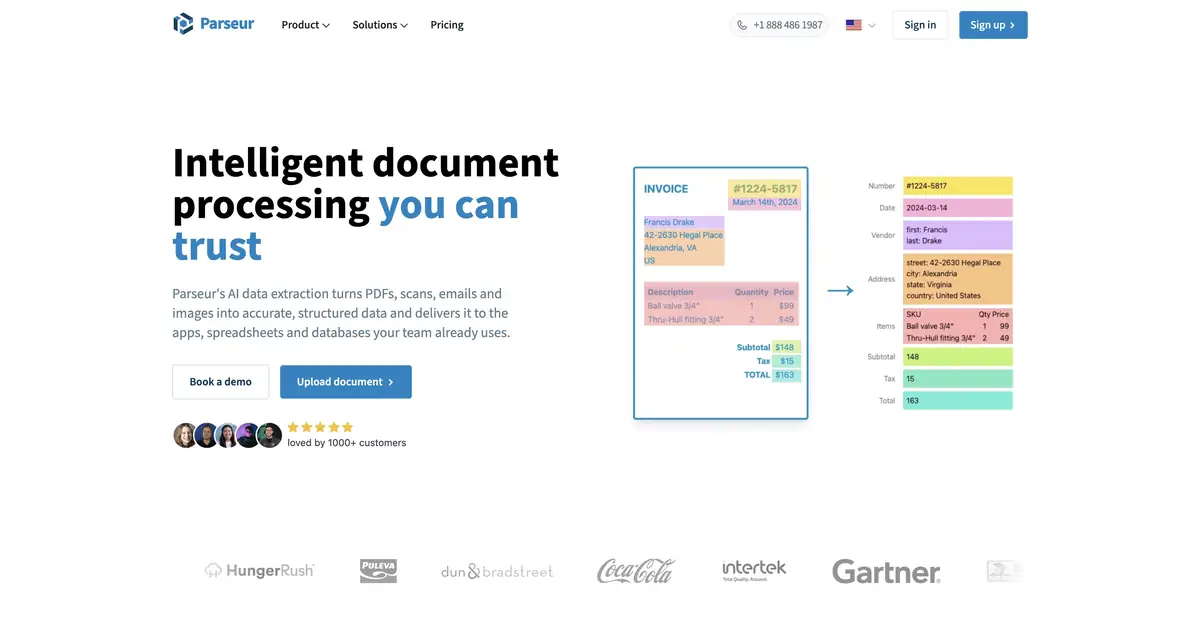
Parseur extracts fields from emails, PDFs and images, then passes them to spreadsheets and apps.
Set the result structure before processing
Parseur accepts documents and email, extracts required fields and sends data to other apps. Its official description distinguishes Vision AI, Text AI and templates. Choose according to the source material and how consistent its layout is.
The service suits recurring incoming files, such as similar emails whose details need collecting in one table. Define fields first. A sent date, document date and deadline are not interchangeable, even if they look similar in the text.
Check an email, a PDF and an unusual record
Prepare several anonymized practice documents containing the same kinds of information. Define fields, extract records and compare them with the originals. Then add a document with one missing value and another split across a line break.
Leave an unknown field empty or send it for manual review. If results go to a spreadsheet, keep the source filename and check for duplicates. This helps correct errors and identify the document that caused them.
After enabling automated delivery, test a destination failure as well as a successful example. An external system may change column names or acceptance rules. Successful text extraction does not establish that the data was written correctly at the final step.
Payment and connection
Parseur has a recurring free tier with a small allowance and paid options for larger volumes. Check current service limits rather than fixed prices in this profile. Count all incoming material, including duplicates and test documents, when choosing a plan.
The official platform describes an API and ready-made integrations. Check supported formats, source languages and required-field accuracy before use. Review storage and access terms separately for sensitive material. This practice example shows configuration, not a measured recognition score.
Suitable tasks
- Extract fields from incoming documents
- Collect entries in the table
- Check incomplete or non-standard file
Strengths
- AI modes and templates for different documents
- API and ready-made integrations
Limitations
- Clear field definitions are needed
- Complicated records require manual verification
Selection and conditions
- Free access
- Yes
- Trial period
- Not confirmed
- No sign-up required
- Not confirmed
- Russian interface
- Not confirmed
- Local installation
- Not confirmed
- API
- Yes
“Not confirmed” means there is not enough information. The feature may still be available; check the developer’s terms.
- Input formats
- Document, Image, Text
- Result
- Table, Data
Terms
Define fields and delivery destinations before processing. The free plan has volume limits; check your formats and results when using AI modes, integrations or the API.From task to first result
Practical example
- Task
- Extract fields from incoming documents
- What to prepare
- Several original anonymized files containing practice requests, plus a table of allowed categories.
Task brief or prompt
Compile one request register, flag duplicates, and list unclear rows separately. Retain the source filename for each record. Do not invent missing dates, delete source files, or send the result. Return an editable spreadsheet for manual review.
Expected result
A draft register file with traceable row provenance; tool execution does not guarantee data accuracy.
How to check the result
- Check blank fields, duplicates, multiline records, and totals.
- Open the returned file in the target program and check the formulas.
- Limit the agent’s access to the necessary materials and check external actions separately.
An editorial teaching example of a task brief, not the result of hands-on testing of the service. Check that the required mode is available, that you have rights to the source material and that the intended use of the result is permitted.
Check details
Official sources
This description is based on the developer’s material. Features, prices and availability may change; check the primary source before use.