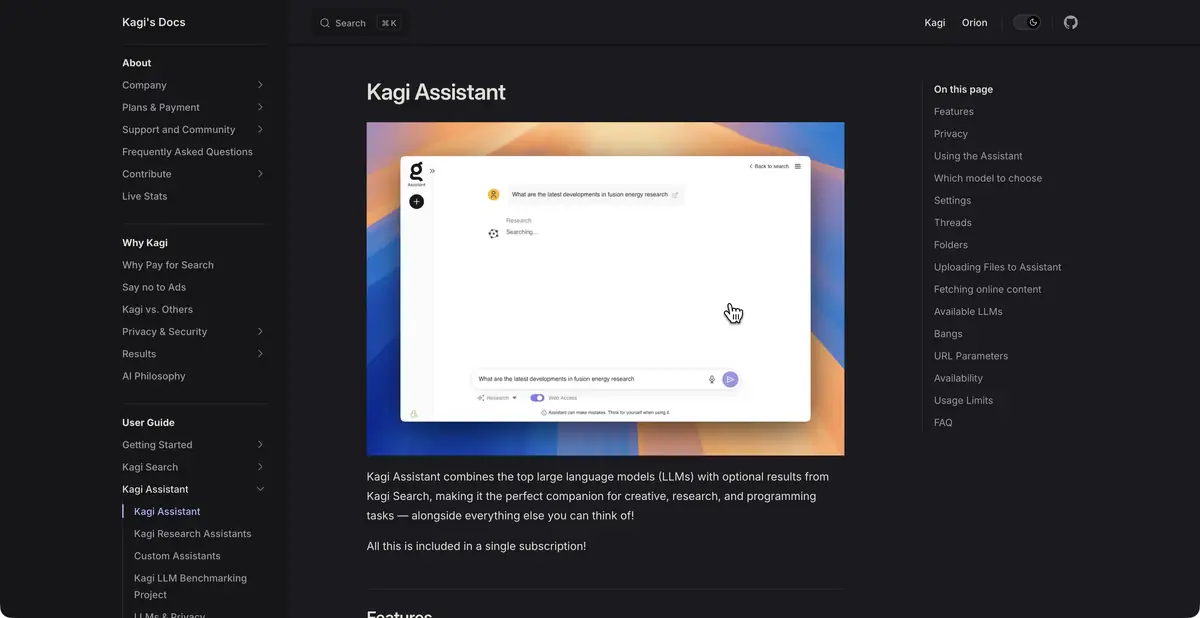
The Kagi Assistant complements the dialogue with a Kagi search, which can be turned on and off for the task. The user chooses a model, adds files and configures their own assistants.
Decide when you need a web
Kagi Assistant connects language models with the Kagi search engine. Web access can be turned on to search for facts and off for subsequent work with the already collected material. The user manages this as part of the conversation, chooses a model and can add files. Such a process is convenient when the search and editing of text alternate in one task.
Independent part of the product - integration of your own search, its settings and dialog interface. In this case, responses are created by connected language models, and the set of available models depends on the subscription.
Sources can be directed
Assistant supports search Lenses and personalized Kagi results. This helps to limit the search area if a particular set of sources is needed for the task. Own assistants allow you to save repetitive instructions, and conversations can be saved and exported.
For example, to compare the two programs, it is useful to direct a search to their official references. Ask to specify in which versions the desired function appeared and what are its limitations. If confirmation is not found, the assistant should leave the question open. The mere presence of a reference in the reply does not yet prove that it confirms a neighbouring statement.
How to read the received summary
Open the documents that justify the comparison. Check the name of the plan, date and exact scope: the possibility in the corporate version does not mean that all users have it. When working with a file, ask to specify a specific section or fragment so as not to look for the base again.
Long conversations also need attention. The documentation describes optimizing history through truncation and summarization. Keep important conditions in explicit instructions and repeat them when the task changes. Do not assume every detail of an early exchange always remains available to the model unchanged.
Subscription and data processing
Kagi has restrictions on the size of the entry, downloads and budget of AI use. Premium models depend on the plan, and the exhaustion of the budget affects further appeals. Before a large series of studies, evaluate the amount of materials and check the current conditions of the account.
A separate official page explains how language-model data is handled. Read it alongside conversation settings and access terms. Kagi’s emphasis on privacy does not make Assistant a local application. For confidential documents, establish in advance whether transfer is allowed and which sources may be used.
Suitable tasks
- Comparing information from official web sources
- Ask a question on the downloaded material
- Use Search Lenses in Conversation
- Create an Assistant with Reusable Instructions
Strengths
- Kagi’s own search and web access management
- Customizable Assistants and Search Lenses
- Files and save or export conversations
Limitations
- Premium models depend on the plan
- A long conversation can be shortened and summed up.
- Subscription has an AI-use budget
Selection and conditions
- Free access
- Not confirmed
- Trial period
- Not confirmed
- No sign-up required
- Not confirmed
- Russian interface
- Not confirmed
- Local installation
- Not confirmed
- API
- Not confirmed
“Not confirmed” means there is not enough information. The feature may still be available; check the developer’s terms.
- Input formats
- Text, URL, Document
- Result
- Text
Terms
Assistant is included in Kagi’s subscription terms, and premium models are available according to the corresponding plan. There is an AI-use budget; permanent free mode has not been confirmed. A web assistant for Kagi users; available models and budget are defined by the plan.From task to first result
Practical example
- Task
- Comparing information from official web sources
- What to prepare
- The question is how two manufacturers describe supporting one feature in their products.
Task brief or prompt
Find the official documents of both manufacturers. Compare the support of the function, specify the date of documents, restrictions and links. Do not deduce the absence of a function only from the absence of a mention.
Expected result
Comparison of the two statements with primary sources and clearly identified gaps.
How to check the result
- Open each link and find the confirming fragment.
- Verify the relevance of the version and the availability of the function on the right plan.
An editorial teaching example of a task brief, not the result of hands-on testing of the service. Check that the required mode is available, that you have rights to the source material and that the intended use of the result is permitted.
Check details
Official sources
This description is based on the developer’s material. Features, prices and availability may change; check the primary source before use.