

Vizcom helps the designer to develop a drawn idea through visualizations and options. The work begins with a sketch or image; three-dimensional generation serves to further verify the shape.
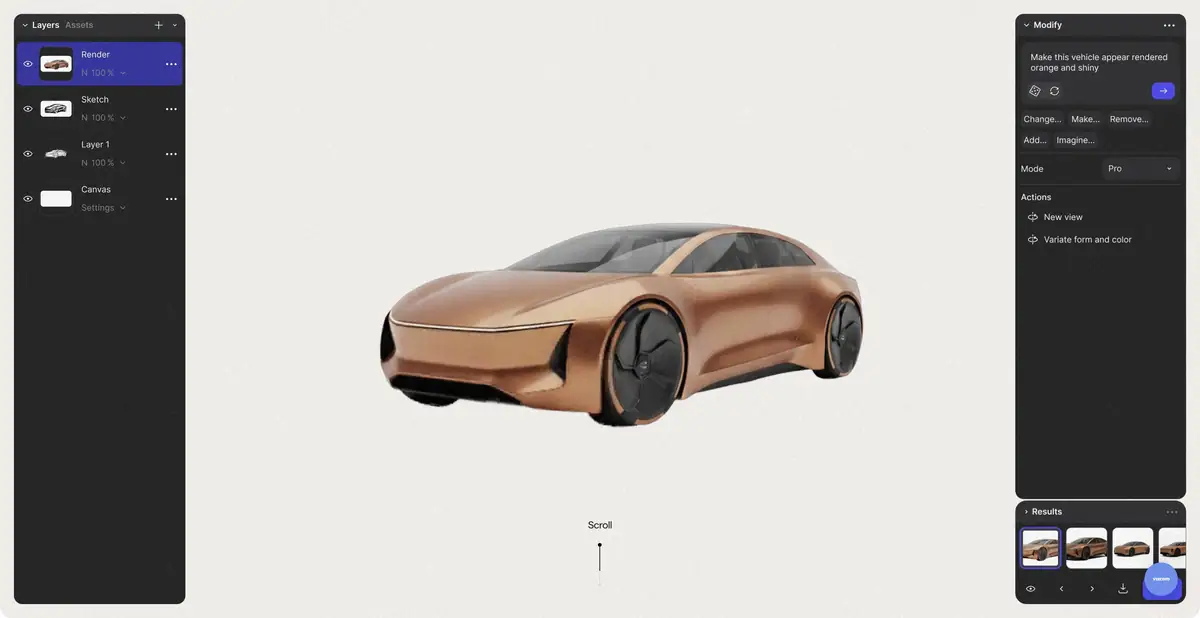
The picture shows the direction
An industrial designer often already knows the silhouette of an object, but wants to see different materials, color solutions and the nature of the surface. Vizcom is focused on such work: its own sketch becomes the basis for AI-visualization and further changes. The image helps to discuss the direction, rather than replacing the dimensions, technological calculations and design of the product.
The initial picture should be clear. Remove the extra lines, show important details and separate the item from the background. If the contour is ambiguous, the algorithm can read it as another object or add a random connection. An accurate description of the material is more useful than a general wish to make the image professional.
Options should be compared on one basis
Documentation describes color and shape changes, references, styles, and work with individual areas. First, fix the main silhouette, then explore the material or finish. If you change proportions, surroundings and lighting at the same time, it becomes more difficult to understand which solution has improved the concept. Saving options helps to return to a successful direction without losing intermediate work.
The ability to 2D to 3D creates a three-dimensional model from an image or visual sketch. It can be viewed from other angles and exported for further work. A detailed mesh editing, if required, is performed in a suitable external program. One beautiful angle does not confirm the correctness of the invisible side or the suitability for manufacturing.
Example: Small desktop speaker enclosure
Sketch your own speaker with a stable base, one handle and a clear control-panel layout. Create matte-plastic and painted-metal versions while preserving the silhouette. In each version, check that the handle opening remains clear, the base stays flat and controls remain distinguishable. Check the button count separately: a convincing image can still change their positions.
Turn the selected concept into a three-dimensional form to discuss proportions. Inspect the back, handle thickness and transition to the base. When importing it into another application, check scale, material and geometry. This file is a starting point for the next stage, not a finished engineering design for the enclosure or proof of structural strength.
The plan affects privacy
Vizcom has free Starter and paid plans with different resources, exports and team capabilities. The official reference separately explains the rights to the material and the use of free-of-charge content to work, promote and improve the platform. The paid terms contain other privacy provisions. These regimes should not be confused with a single promise of confidentiality.
Before uploading an unpublished client concept, check the appropriate plan and permission for processing. Also compare the cost of credits for variations, volumetric generation and image magnification. The strength of the process is in the quick exploration of the direction, but the selection of ideas, technical elaboration and final form check remain the work of the designer.
Suitable tasks
- Explore the material and color of your own sketch
- Compare the shape options of the subject
- Check the volumetric blank on the concept
Strengths
- The process around the design sketch
- Options and work with references
- Documented transition from 2D to 3D
Limitations
- Visualization does not replace engineering project
- Privacy depends on the plan
- Mesh and export require verification in the external program
Selection and conditions
- Free access
- Yes
- Trial period
- Not confirmed
- No sign-up required
- Not confirmed
- Russian interface
- Not confirmed
- Local installation
- Not confirmed
- API
- Not confirmed
“Not confirmed” means there is not enough information. The feature may still be available; check the developer’s terms.
- Input formats
- Sketch, Image, Text
- Result
- Image, 3D model
Terms
Starter is free, but its terms of use differ from paid plans. 3D generation does not replace CAD and mesh checks. The API and the locality of AI processing are not confirmed.From task to first result
Practical example
- Task
- Explore the material and color of your own sketch
- What to prepare
- Own clear sketch of the desktop subject with important details and desired material.
Task brief or prompt
Visualize this sketch of a desktop speaker in matte plastic under soft studio lighting. Preserve the silhouette, open handle, flat base and panel layout. Create a different-material version separately, retaining the geometry for comparison.
Expected result
Visual versions of the concept on its own sketch; size and suitability for production are not confirmed.
How to check the result
- Check the silhouette, number of parts and connection to the sketch.
- When moving to 3D, inspect the hidden sides, grid and scale; check the privacy of the plan.
An editorial teaching example of a task brief, not the result of hands-on testing of the service. Check that the required mode is available, that you have rights to the source material and that the intended use of the result is permitted.
Check details
Official sources
- The current Vizcom platform
- Current Plans and Credits
- 2D to 3D process
- Privacy and rights according to plans
This description is based on the developer’s material. Features, prices and availability may change; check the primary source before use.