

Apple's digital audio workstation. Session Players create editable accompaniment parts from project settings.
Chords as the basis for accompaniment
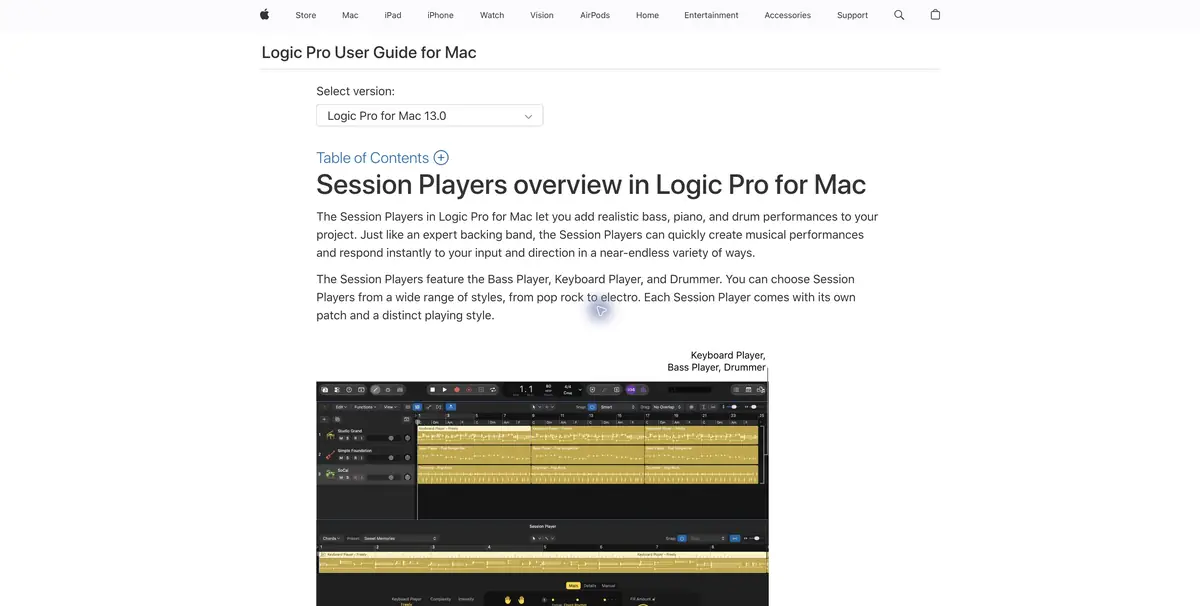
Session Players in Logic Pro turn the project's chord progression into accompaniment while you sketch the arrangement. Choose a player and adjust the playing style. With the chords entered correctly, you can compare ideas on the same material. This is useful before recording live musicians, when you need to decide where the accompaniment should be busy and where to leave room for the soloist.
A two-part demo
For a tutorial example, prepare eight verse bars and four chorus bars with your own voice or melody. Enter the chords and add a Session Player bass part. In the verse, listen to a calm option, and in the chorus increase your activity. Then add the keys. If both tools often start the phrase together, reduce the number of events on one of the tracks and check the transition again.
Rhythmic accents are more convenient to compare in the context of voice. When the voice sounds alone, it is difficult to notice where the bass is arguing with the ending of the phrase.
Take the demo into recording
Leave the project with editable tracks and make a separate audio export for musicians. Clarify the tone, tempo and boundaries of the parts. Support is subject to project settings, so check the chord path first. Apple publishes separate requirements for versions of Logic Pro. Before transferring the project to a person with another device, check if he can open it without replacing the tools.
Suitable tasks
- Assemble the accompaniment to the song sketch
- Compare the two rhythms
Strengths
- Parts follow the project's harmony
- Dynamics and complexity can be controlled separately
Limitations
- The chords and pace must be prepared.
- The device affects the availability of individual functions
Selection and conditions
- Free access
- Not confirmed
- Trial period
- Not confirmed
- No sign-up required
- Not confirmed
- Russian interface
- Not confirmed
- Local installation
- Not confirmed
- API
- Not confirmed
“Not confirmed” means there is not enough information. The feature may still be available; check the developer’s terms.
- Input formats
- Audio, Accords
- Result
- Audio
Terms
Logic Pro is available for compatible Apple devices. Functions and requirements may vary between platforms.From task to first result
Practical example
- Task
- Assemble the accompaniment to the song sketch
- What to prepare
- Its four beats of melody, known chords and selected tempo.
Task brief or prompt
Create a bass part of the project chords. Check out how it combines with the pauses in the melody.
Expected result
Editable party for rough arrangement.
How to check the result
- Check the chord change at the beginning of the beat.
- Compare the different density of the game next to the melody.
An editorial teaching example of a task brief, not the result of hands-on testing of the service. Check that the required mode is available, that you have rights to the source material and that the intended use of the result is permitted.
Check details
Official sources
This description is based on the developer’s material. Features, prices and availability may change; check the primary source before use.