

Kokoro synthesizes speech from text in an environment you manage. It supports narration in the documented languages and programmatic speech workflows.
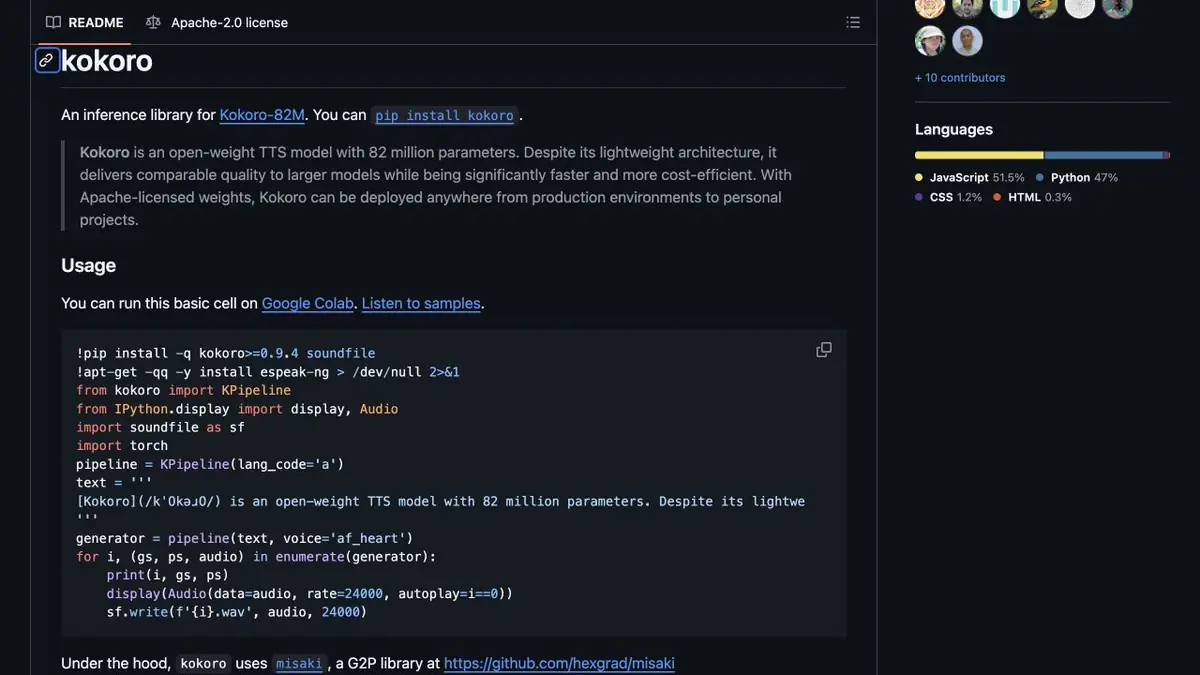
From text to an audio file
Kokoro is an open speech synthesis model with 82 million parameters. You choose a language and a preset voice, provide the text and save the resulting audio. The official library supports speed adjustment and splitting text into segments. It is a model and a software library, so you need separate tools for editing tracks, storing projects and publishing the narration.
The official example uses KPipeline to generate audio and saves it as WAV at 24 kHz. For a repeatable workflow, keep the source text, voice identifier and settings. This record helps explain why two versions of the same instruction differ in pace or pronunciation. Performance depends on the hardware and environment; no comparative quality test was carried out here.
Available languages and voices
The documentation lists English, Spanish, French, Hindi, Italian, Japanese, Brazilian Portuguese and Mandarin Chinese. American and British voices are available for English. The language code must match the selected voice. Support for Russian is not stated in the official documentation.
The amount of training data and the quality of individual voices vary. The authors explicitly describe limitations for some languages and warn that very short utterances and long passages may sound worse. Before generating an entire chapter, prepare a short excerpt containing names, numbers and terms typical of your material. Listen to it before processing the rest of the text.
An example for a training video
Suppose you need an English narration for a video showing how to set up an application. Prepare a complete paragraph, select an English voice and save the first version without changing the text. In a second version, change only the speed. Compare the clarity of names, pauses before actions and phrase endings, then choose a pace that fits the video.
If the voice starts rushing through a long passage, split the text at a meaningful point and listen to the transition again. Do not cut a sentence merely to make the segments equal in length, as this can disrupt the intonation. Check numbers and abbreviations separately. One paragraph sounding good does not confirm the quality of an entire training course.
Local deployment and terms of use
The code and weights are available under Apache 2.0. The official instructions explain how to install the Python package and its dependencies; some languages require additional components. Once the necessary files are downloaded, you can run processing in your own environment. This requires setup, maintenance and your own computing resources.
The model license is not a cloud service subscription and does not pay for external hosting. Follow the license requirements when distributing code or modified components. Check rights to the text and permission for your particular use of the audio separately. Do not assume that external websites with Kokoro in their domain are official services run by the author.
Suitable tasks
- Narrate your own learning materials in a supported language
- Build a local workflow for converting text to audio
- Choose a voice and pace for a short instruction
Strengths
- Open weights and a library for local deployment
- Documented voices, speed control and audio export
Limitations
- Russian is not listed in the official language list
- Requires environment setup and a check of each selected voice
Selection and conditions
- Free access
- Yes
- Trial period
- Not confirmed
- No sign-up required
- Not confirmed
- Russian interface
- Not confirmed
- Local installation
- Yes
- API
- Not confirmed
“Not confirmed” means there is not enough information. The feature may still be available; check the developer’s terms.
- Input formats
- Text
- Result
- Audio
Terms
The code and weights are available under Apache 2.0. You need your own environment and dependencies; Russian is not in the official language list. A public cloud API provided by the author has not been confirmed.From task to first result
Practical example
- Task
- Narrate your own learning materials in a supported language
- What to prepare
- Your own English instruction text, a configured Kokoro environment and a suitable English voice.
Task brief or prompt
Open your profile and choose Settings. In the Notifications section, select which messages you want to receive. You can turn off promotional messages while keeping security alerts enabled. Before you close this window, check that your changes have been saved. If the settings look different, return to your profile and review the notification options again.
Expected result
A draft English narration in the selected voice, ready to save as an audio file; speed is set through the synthesis parameter.
How to check the result
- Listen to phrase endings and the pause before each action.
- Compare two speed settings using the same text and voice.
- Check that splitting the text does not lose words and that the transitions sound natural.
An editorial teaching example of a task brief, not the result of hands-on testing of the service. Check that the required mode is available, that you have rights to the source material and that the intended use of the result is permitted.
Check details
Official sources
This description is based on the developer’s material. Features, prices and availability may change; check the primary source before use.