

Framer AI works with the visual editor to take a website from its first version to publication on Framer. Generated elements remain editable, and custom domains are connected under the platform's terms.
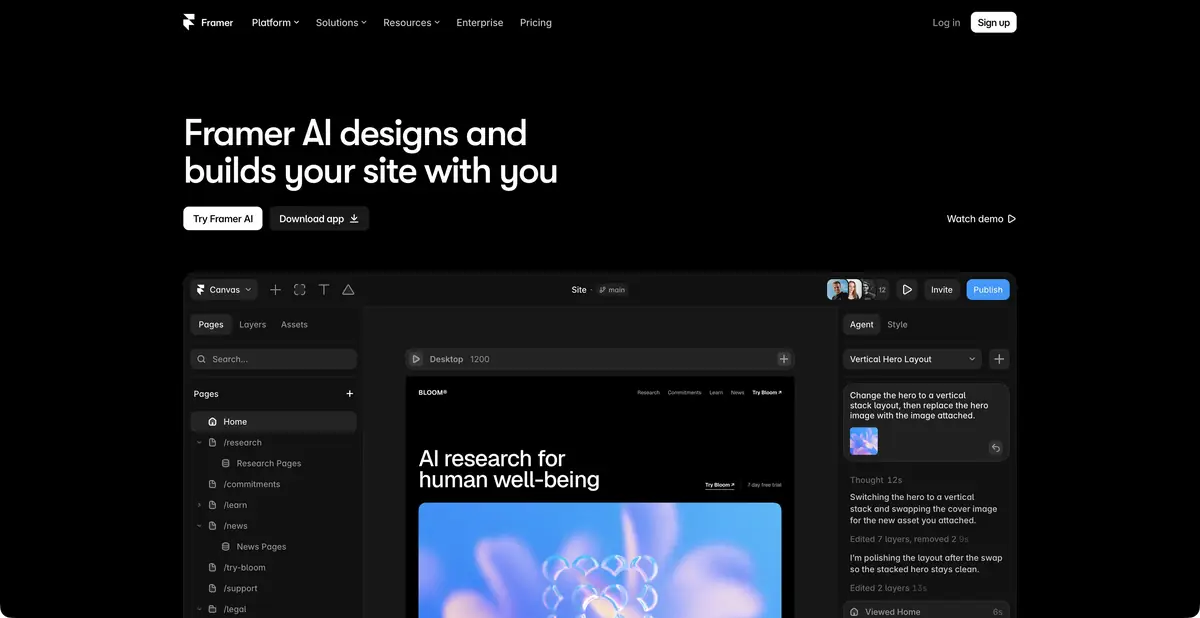
AI assistant alongside the visual editor
Framer AI suits landing pages, portfolios and multi-page websites intended for ongoing development within Framer. The agent helps create the first version and make further edits, while the user retains control over layers, typography, components and responsive sizing. This is a workspace for a specific platform, not a promise to export arbitrary standalone code to any host.
Changes remain part of the project
According to the description, you can change the website's composition, text, design and elements. The result remains editable: layers and components can be changed with standard Framer tools. CMS, navigation and reusable templates also matter for a content website. Test their behavior in the finished project, as well as in a wide-screen preview.
AI credits are used differently. The official help distinguishes credit-intensive agent, Workshop and translation actions from small supporting operations such as renaming layers. Running out of credits therefore does not necessarily disable the entire editor, but limits further actions that use the quota.
Example: page of the creative workshop
Provide a short brief: which classes the workshop offers, who they suit and how visitors can find the schedule. Include only confirmed information. Request an understated structure with a clear opening section, work examples and contact details.
After generation, check the narrow-screen view. The heading should be fully readable, buttons should work with a keyboard and long class names should not break the cards. Then follow every link and check where the form actually sends data.
Test the website against visitor tasks: finding a suitable class, understanding the terms and contacting the workshop. If reaching the contact details requires passing through several decorative screens, simplify the path.
What can be automated and where to publish
The developer documentation describes Plugin API and Server API for working with projects, CMS, settings and publishing. These automation options within Framer require appropriate authorization and careful permission management.
Official help explicitly states that a published website cannot be downloaded as a finished HTML package for your own hosting. Using a custom domain on Framer infrastructure is a separate option. If the project requires an independent static build on your server, account for this limitation before designing.
Cost of use and final verification
A free tier and paid website plans are available. Free provides a limited initial AI balance, not unlimited monthly agent use. Paid plans have their own terms for credits, CMS, traffic, localization and extra features.
Before launching a website, check facts in the text, images, the mobile version and accessibility. A live publication on a domain does not confirm correct business logic, data processing or external integrations — these remain separate responsibilities of the project.
Suitable tasks
- Create and develop a landing page within Framer
- Check structure and design options
- Modify content and components with an AI assistant
- Automate CMS and publishing actions through Server API
Strengths
- Editable layers instead of a fixed layout
- AI edits in a shared visual project
- CMS and platform publishing
- Documented Plugin API and Server API
Limitations
- No export of a finished website as an HTML package for your own hosting
- Free has a limited starter AI balance
- Forms, mobile version and facts require their own verification
Selection and conditions
- Free access
- Yes
- Trial period
- Not confirmed
- No sign-up required
- Not confirmed
- Russian interface
- Not confirmed
- Local installation
- Not confirmed
- API
- Yes
“Not confirmed” means there is not enough information. The feature may still be available; check the developer’s terms.
- Input formats
- Text, Image, Code
- Result
- Site, Prototype
Terms
Free provides a limited initial AI credit balance. Websites are published on Framer; a finished HTML package cannot be exported for another host.From task to first result
Practical example
- Task
- Create and develop a landing page within Framer
- What to prepare
- Description of the workshop, your own photos and verified information about services for a small site.
Task brief or prompt
Prepare a workshop site with sections about services, work process and contacts. Use the facts and photos provided. Check the mobile layout, titles and form behavior in the editor. Publish only after manual verification.
Expected result
Editable website project within the platform with its hosting terms. An independent HTML package for another server is not promised.
How to check the result
- Review wide and narrow versions, long headings and navigation items.
- Check the actual sending of the form, contacts and rules for processing the entered data.
- Before choosing a platform, check the domain, hosting plan and restrictions on moving the website.
An editorial teaching example of a task brief, not the result of hands-on testing of the service. Check that the required mode is available, that you have rights to the source material and that the intended use of the result is permitted.
Check details
Official sources
This description is based on the developer’s material. Features, prices and availability may change; check the primary source before use.